Audio calibration software is what turns a correctly wired speaker system into one that has been proven to work — measuring real SPL, frequency response, time alignment and room acoustics on site, then writing that data back to the DSP instead of guessing. For AV integrators used to juggling separate apps for room correction, RT60 measurement and DSP programming, the argument for one calibration toolkit built into the amplifier controller is simple: one measurement pass instead of three, and nothing to export between programs. XSCACE Studio is built around exactly that — a free macOS and Windows app whose eleven-instrument calibration toolkit sits inside the same interface used to program the Xylem DSP amplifier series.
Audio Calibration Software at a Glance
- Eleven instruments: SPL, Delay, Levels, Polarity, Frequency Response, THD, Sub Align, Transfer Function, RT60, RTA, Export
- One sweep per channel populates delay, polarity and frequency response together — roughly 27 seconds for three channels
- RT60 aligned to ISO 3382; RTA rates background noise from NC-15 to NC-65
- THD measured as H2+H3, 30Hz–5kHz, gated against the measurement floor
- Impulse responses export to WAV for REW or Smaart; sessions export to PDF or raw JSON
- Free for macOS and Windows — no subscription on any calibration function
What Audio Calibration Software Actually Measures
Calibration is more than one number. SPL confirms output matches the design target. Frequency response and THD (measured via the Farina sweep method) show whether a driver is behaving or a voice coil is starting to rub. Delay, level and polarity determine whether multiple speakers sum constructively at the listening position or cancel each other out. And room acoustics — RT60 and background noise (NC) — determine whether a system that measures perfectly at the microphone will actually sound clear once furniture, glass and drywall get involved. Audio calibration software exists to make all of these repeatable and documented, not eyeballed once at commissioning and never checked again.
Before the First Sweep
Three things decide whether a measurement session produces usable numbers or noise. The microphone should sit at the primary listening position at ear height, pointed up for room measurements or toward the speakers for correction sweeps. Channel gains should be set to a known reference — X-Sense asks for −20dB before it starts — so nothing clips mid-sweep. And absolute SPL readings require a reference: either a 94dB acoustic calibrator fitted to the mic, or a loaded calibration file. Without one, the SPL meter and the RTA both report relative dBFS rather than true dB SPL, and the NC rating cannot be calculated at all.
The Eleven Instruments, in the Order You Would Use Them
| Instrument | What it measures | Key output |
|---|---|---|
| SPL Meter | Sound pressure level, A/C/Z weighted | Live dB SPL, Leq, max hold; 94dB reference |
| Delay | True acoustic arrival time per channel | Delay in ms, clock-drift corrected |
| Levels | Relative channel level | Per-channel trim in dB |
| Polarity | Driver wiring polarity | Normal or inverted, per channel |
| Frequency Response | On-axis response via Farina sweep | 1/6-octave smoothed curve, level-normalised |
| THD | Harmonic distortion, H2+H3 | % distortion, 30Hz–5kHz, noise-floor gated |
| Sub Align | Subwoofer-to-main integration | Crossover Hz, delay ms, all-pass filter |
| Transfer Function | Live system response vs reference | Dual-FFT magnitude, phase, coherence |
| RT60 | Reverberation decay time | Overall + per-band seconds, ISO 3382 |
| RTA | Background noise, 1/3-octave | NC-15 to NC-65 rating + limiting band |
| Export | Session logging | Branded PDF, JSON, per-channel WAV |
SPL Meter
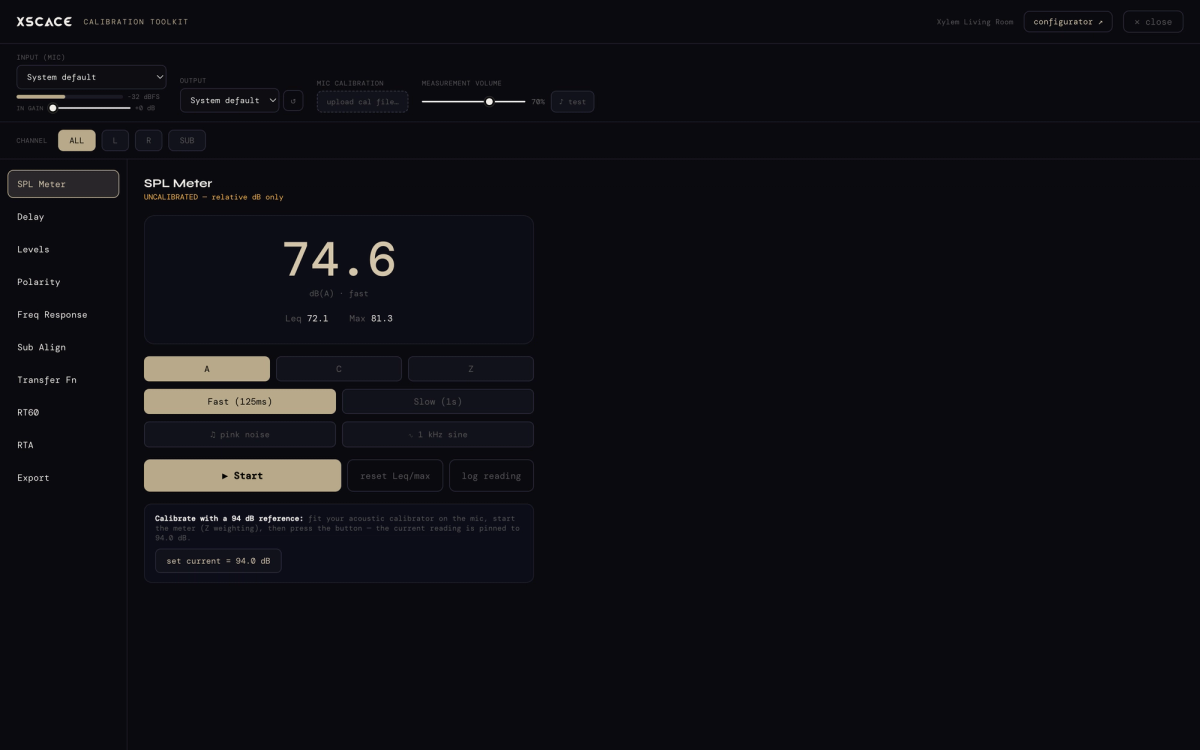
The reference instrument everything else is checked against. A, C and Z weighting; fast (125ms) and slow (1s) integration; live Leq and max hold running alongside the instantaneous reading. Built-in pink noise and 1kHz sine generators mean no separate source is needed, and a single button pins the current reading to 94.0dB when an acoustic calibrator is fitted — which is what converts every later reading from relative to absolute.
Delay, Levels & Polarity
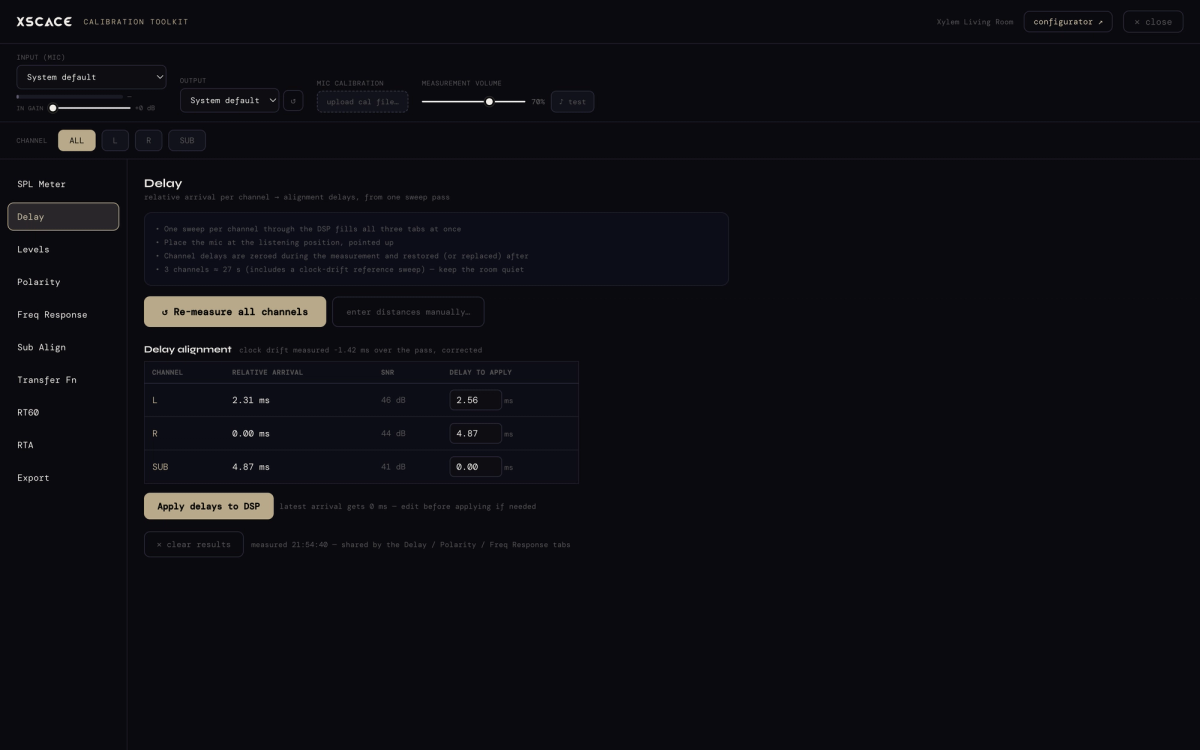
One sweep per channel measures true acoustic arrival at the listening position, and the results arrive as a table rather than a graph to interpret: relative arrival, signal-to-noise ratio, and the delay to apply. The latest-arriving channel is assigned 0ms and everything else is delayed to match it. Two details matter more than they look. Each channel carries its own SNR figure, so a measurement taken in a room that was not quiet enough is visible rather than silently wrong. And clock drift between the audio interface and the DSP is measured across the pass and corrected — in the session shown, −1.42ms of drift that would otherwise have been baked straight into the alignment. Delays write to the DSP in one click, and remain editable first.
Frequency Response, Step Response & THD
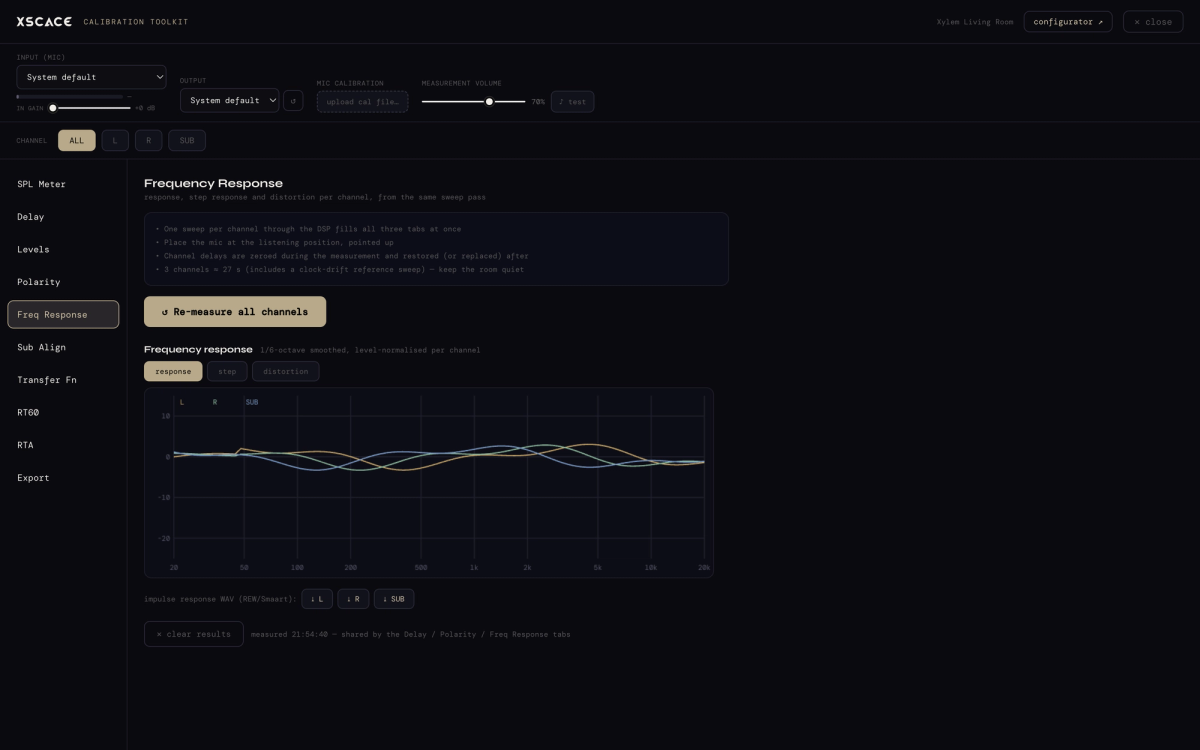
The same sweep that produced the delay figures also fills the response, step and distortion tabs — one pass, three views, no re-measuring. Response is shown 1/6-octave smoothed and level-normalised per channel so the curves can be compared to each other rather than to an arbitrary absolute level. Three channels take roughly 27 seconds including the clock-drift reference sweep. Channel delays are recorded during the measurement and restored afterwards, so running a sweep does not leave the system in a different state than it started.
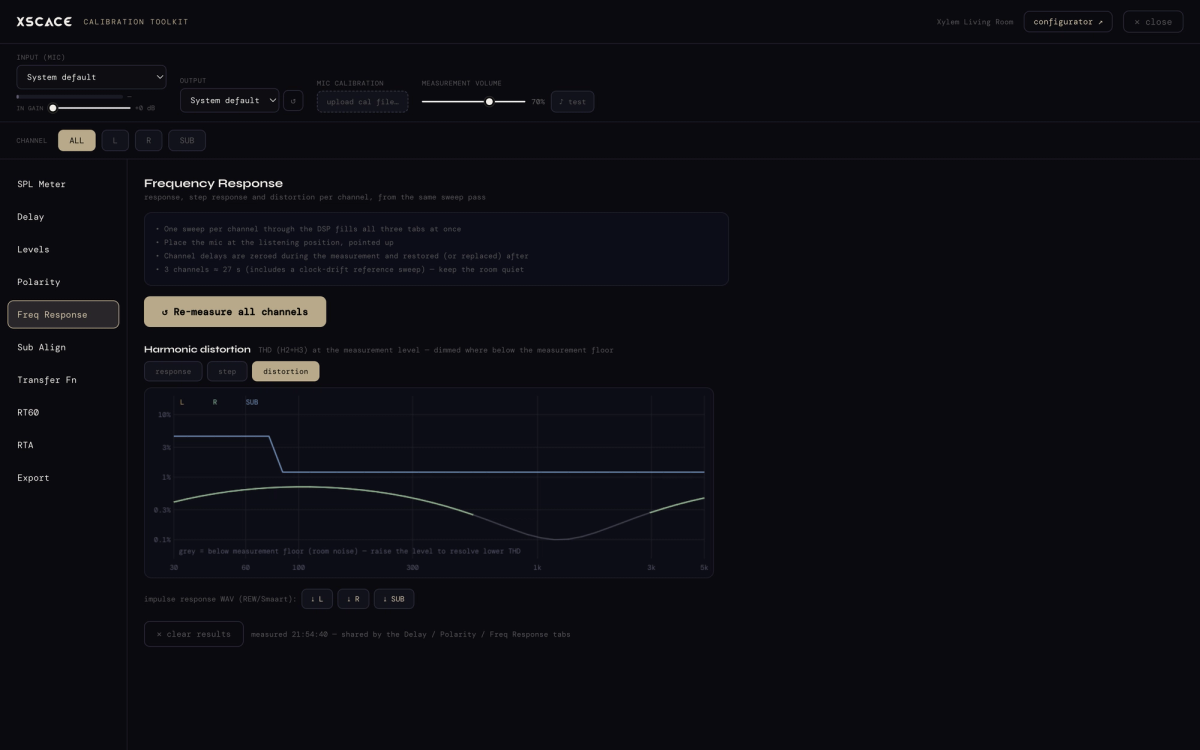
The distortion tab is where the discipline shows. THD is measured as H2+H3 at the measurement level across 30Hz–5kHz, and any part of the curve that falls below the room's own noise floor is greyed rather than plotted — the software declines to report distortion figures it cannot actually resolve, and tells you to raise the level instead. Impulse responses for each channel export to WAV for REW or Smaart when an analysis deeper than commissioning is genuinely warranted.
Sub Align
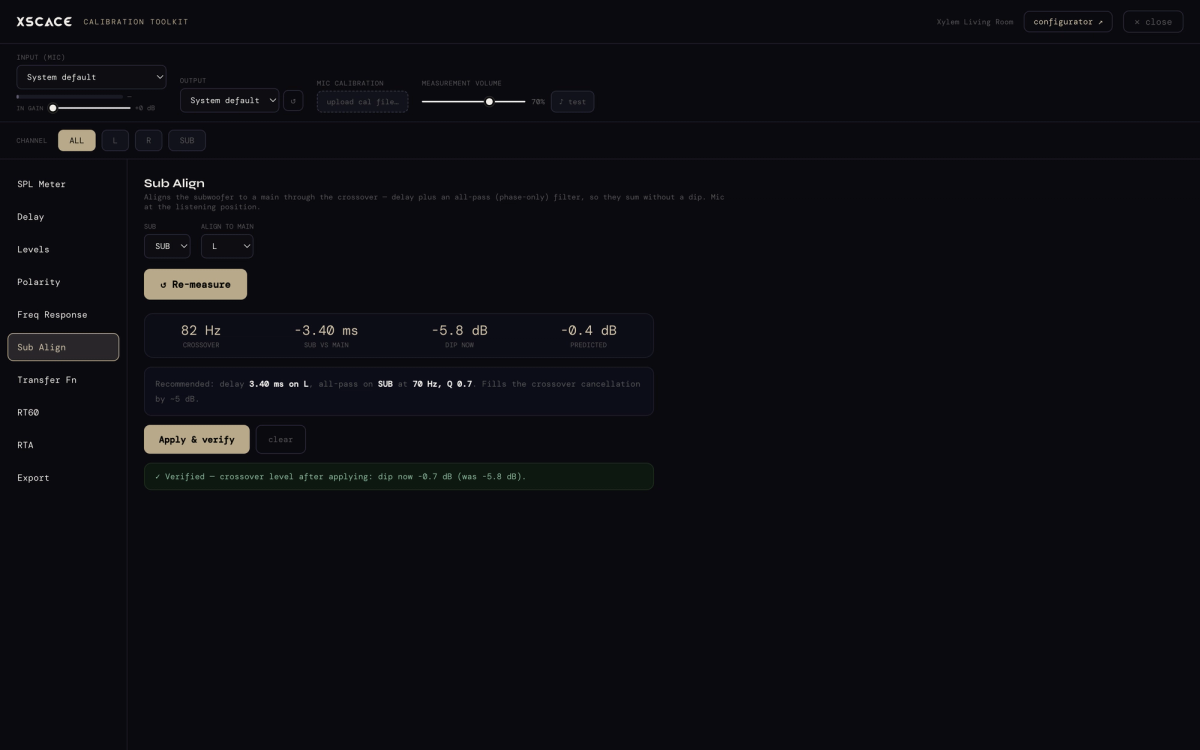
Subwoofer integration is the single most commonly botched step in commissioning, and this is the instrument that makes it deterministic. Sub Align finds the acoustic crossover automatically, then computes both the delay and an all-pass (phase-only) filter needed to make the sub and the main sum rather than cancel. The session shown found the crossover at 82Hz, recommended 3.40ms of delay on the left channel plus an all-pass on the sub at 70Hz with Q 0.7, and — critically — re-measured after applying it: the crossover dip went from −5.8dB to −0.7dB, verified rather than assumed.
Transfer Function
A live dual-FFT measuring system response continuously against a known pink-noise reference, with a coherence trace showing which parts of the curve are trustworthy — 0.9 and above is solid, below that the measurement is being contaminated by noise or reflections. The distinction the tool itself draws is the useful one: the transfer function is what the system is doing, while the RTA is what the microphone hears, including everything else in the room.
RT60 & Waterfall
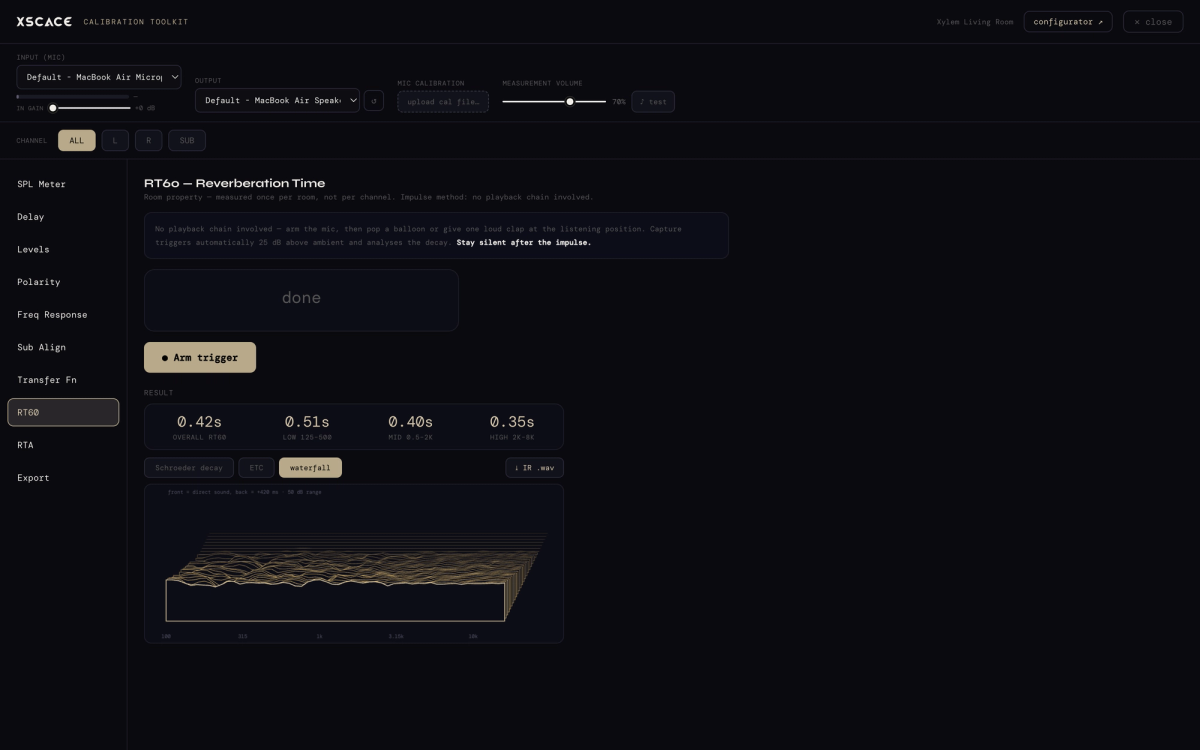
Arm the trigger, pop a balloon — or fire the impulse from the speakers themselves — and one capture yields overall and per-band reverberation time, an energy-time curve, and a spectral decay waterfall, aligned to ISO 3382. Per-band matters: a room with a 0.42s overall RT60 might be 0.51s in the low band and 0.35s in the high, which is a different acoustic problem, and a different treatment recommendation, than the single average number suggests.
RTA & Noise Rating
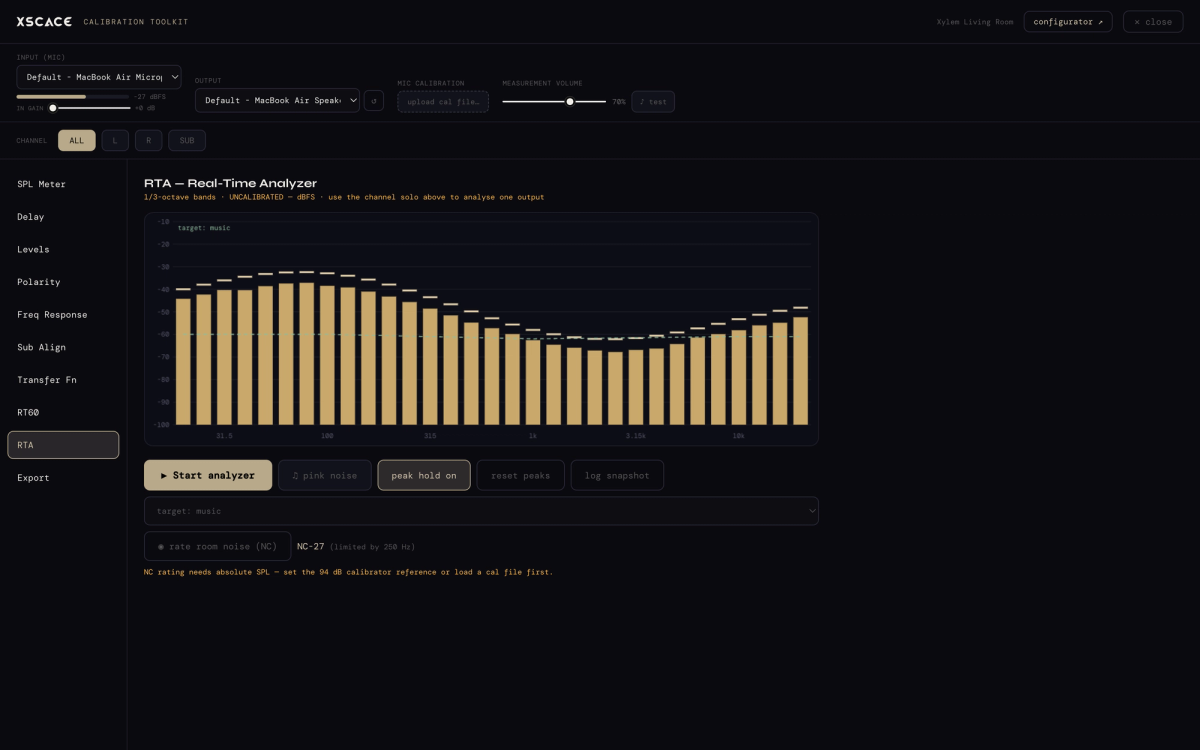
A 1/3-octave real-time analyzer with peak hold, selectable target curves and snapshot logging. Its most commercially useful function is the noise rating: one button rates the room's background noise on the NC scale and reports which band set the limit — NC-27, limited by 250Hz, in the session shown. That turns "is this room quiet enough for a cinema" from an opinion into a number a client can be shown. It requires the 94dB reference to have been set first, and says so rather than silently reporting a wrong figure.
Export & Reporting
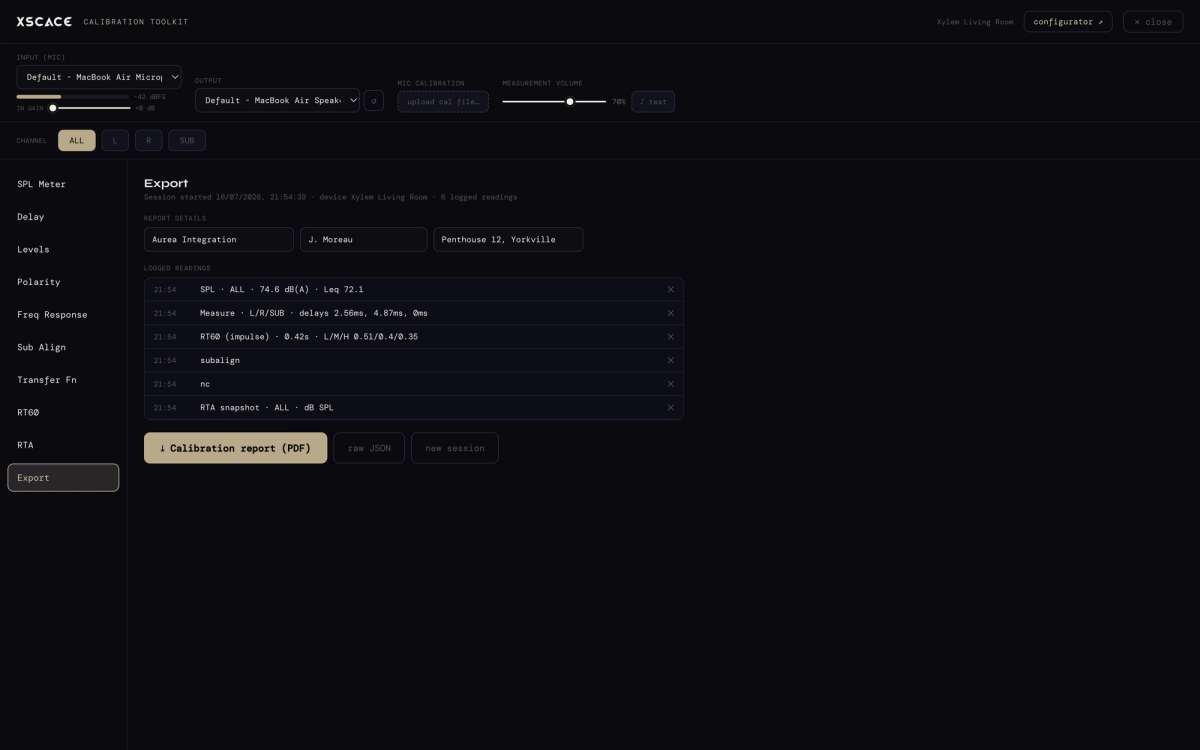
Every reading taken during a session logs to a per-device history that survives restarts. The export view collects them — SPL, delays, RT60 with per-band figures, sub-align, NC rating, RTA snapshots — attaches integrator, client and project details, and produces either a branded PDF calibration report or raw JSON for integrators who want to keep the numbers in their own documentation system.
A Commissioning Pass, Start to Finish
The instruments are listed in the sidebar in roughly the order a commissioning pass actually runs, and the order matters because each step depends on the one before it.
- Set the reference — fit a 94dB calibrator or load a calibration file, so every reading afterwards is absolute rather than relative
- Measure the room before the system — RT60 and NC first, because they determine what the system can realistically achieve and whether the room is quiet enough to measure in at all
- Sweep every channel — one pass fills delay, polarity and frequency response together; check the per-channel SNR before trusting the numbers
- Apply delays and polarity to the DSP, then integrate the subwoofer with Sub Align and let it verify the correction by re-measuring
- Verify with the transfer function or a second sweep, confirming the correction did what it claimed
- Export the session as a PDF report — the document that turns "we tuned it" into evidence
RT60 and Room Acoustics, Not Just Speaker Output
Most calibration workflows stop at the speaker. Measuring the room too is what separates a system that measures well at the microphone from one that sounds clear in use. Pair per-band RT60 with the RTA's NC rating and you have both halves of the room's acoustic character: how long sound persists, and how much noise it is competing with. This is also the measurement discipline that feeds XSCACE's Floorplan Sound Simulation tool — a measured RT60 entered into the planner is mathematically inverted into the room's true average absorption, which re-drives the whole simulation and turns a prediction into a verified as-built document.
X-Sense Room Correction vs. the Calibration Toolkit
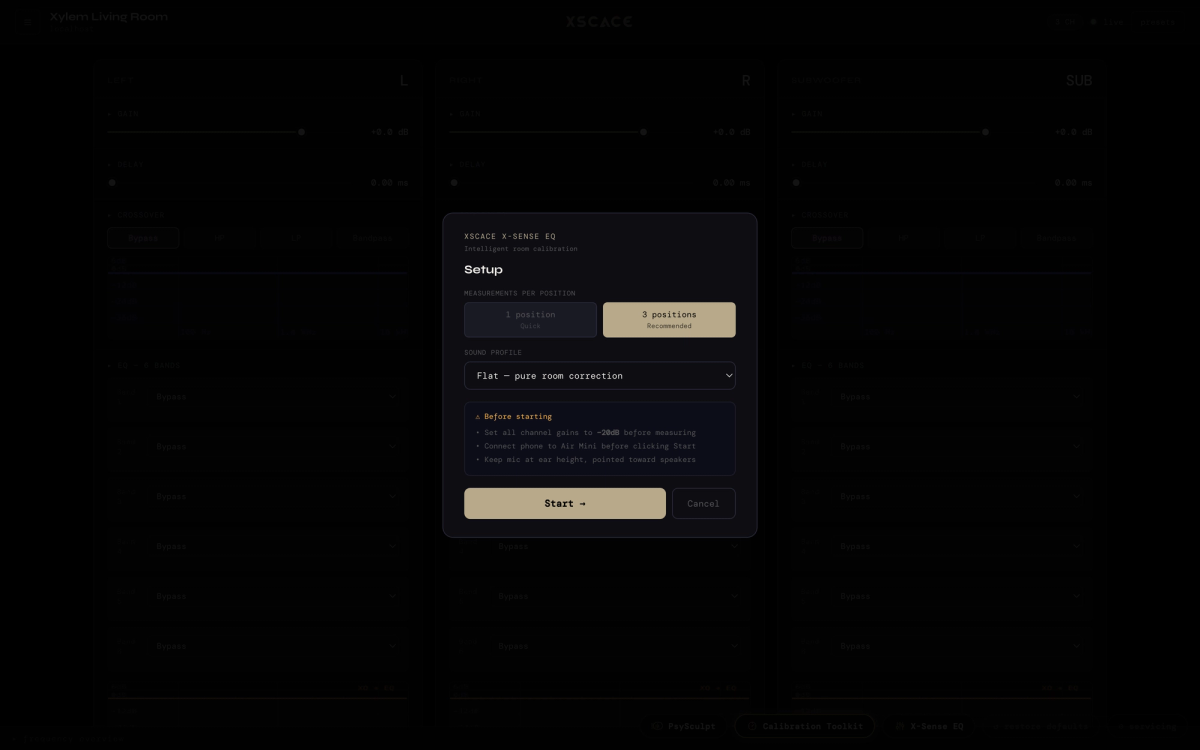
These solve adjacent problems and are easy to confuse. The Calibration Toolkit measures and documents — it tells you what is happening and produces the evidence. X-Sense corrects: a guided routine that sweeps from one position (quick) or three (recommended), fits corrective EQ against a chosen sound profile, then runs a verification pass overlaying before, target and after so the correction is demonstrated rather than promised. In practice most commissioning uses both — X-Sense to arrive at the correction, the toolkit to prove and document the result. X-Sense asks for channel gains at −20dB and the mic at ear height before it begins, for the same reason the toolkit does.
Using XSCACE with Third-Party Equipment
A common assumption about manufacturer software is that it only works inside that manufacturer's ecosystem. That is not the case here, and the reason is in the amplifier's input stage rather than the software.
Every Xylem DSP amplifier accepts a Line In and a High Level Speaker Input. Line In takes a line-level feed from any source — a third-party AV receiver's pre-outs, a matrix switcher, a streamer, a mixer, a processor from any brand. High Level Speaker Input goes further: it accepts an existing amplifier's speaker-level output directly, so a Xylem can be inserted downstream of an amplifier already installed on site without replacing it. There is also a Line Out for passing signal on to another zone or a powered subwoofer.
Once the signal is in, everything the XSCACE Studio does applies regardless of what produced it. Per-channel DSP, time alignment, crossovers, parametric EQ, X-Sense room correction and the full calibration toolkit all operate on the signal at the amplifier, not on some proprietary handshake with an XSCACE source. A room fed by a third-party AVR can still be measured, corrected and documented exactly as described here.
- Line In — line-level from any AVR, processor, matrix, streamer or mixer
- High Level Speaker Input — insert downstream of an existing third-party amplifier
- Line Out — pass signal onward to another zone or a powered subwoofer
- XSCACE speakers are passive throughout, so they can equally be driven by a third-party amplifier
The one boundary worth stating plainly: the measurement instruments work on any system the microphone can hear, and impulse responses export to WAV for REW or Smaart, but writing DSP corrections back into the amplifier requires the amplifier to be a Xylem.
How Does XSCACE Compare to REW, Smaart and Dirac Live?
The honest answer is that they overlap but are built for different jobs. REW and Smaart are measurement platforms — extremely capable, brand-agnostic, and they end at a measurement you then act on somewhere else. Dirac Live is a correction engine that writes to licensed hardware but does not document a room. XSCACE Studio is built to do the commissioning job end to end: measure, write the correction to the amplifier, verify it, and produce the report the client signs off.
| XSCACE Studio | REW | Smaart | Dirac Live | |
|---|---|---|---|---|
| Cost | Free | Free | Paid licence | Paid licence |
| Platform | macOS, Windows | Win/Mac/Linux | Windows, macOS | Win/Mac + hardware |
| Primary purpose | Measure, correct and document | Measurement + analysis | Live sound analysis | Room correction |
| Writes DSP directly | Yes, to Xylem amplifiers | No | No | Yes, to licensed hardware |
| RT60 with per-band | Yes, ISO 3382 | Yes | Yes | No |
| NC noise rating | Yes, NC-15 to NC-65 | No | No | No |
| Automatic sub alignment | Yes, with verification pass | Manual | Manual | Partial |
| Client-ready PDF report | Yes, branded | No | No | No |
| Works on third-party systems | Measurement yes, DSP write no | Yes | Yes | Licensed hardware only |
The practical dividing line: if you need forensic analysis of a loudspeaker design, use REW or Smaart — and XSCACE exports impulse responses as 32-bit float WAV precisely so you can. If you need to commission an installed system and leave documentation behind, the integrated toolkit removes the export-and-re-enter step entirely.
Audio Calibration Terms, Defined
Calibration has a vocabulary that is easy to use loosely. These are the terms this guide relies on, with the standard or typical value each is measured against.
| Term | Definition | Reference / typical value |
|---|---|---|
| SPL | Sound pressure level, the loudness of sound at the microphone | dB SPL; 94dB is the standard calibrator tone |
| Leq | Equivalent continuous level — the average over a measurement period | Reported live alongside instantaneous SPL |
| RT60 | Time for sound to decay 60dB after the source stops | ISO 3382; 0.3–0.5s typical for home listening |
| NC rating | Noise Criteria — a room’s background noise on a standard curve set | NC-15 (very quiet) to NC-65; NC-25 or below suits cinema |
| THD | Total harmonic distortion — unwanted harmonics a driver adds | Measured as H2+H3 across 30Hz–5kHz |
| Coherence | How much of a transfer-function measurement is trustworthy | 0.9 and above is reliable; below that is noise-contaminated |
| All-pass filter | A filter that shifts phase without changing magnitude | Used in Sub Align to make sub and main sum |
| Farina sweep | Log sine sweep that separates distortion from linear response | The method behind the response and THD tabs |
| Impulse response | The system’s output to an ideal impulse; everything derives from it | Exports as 32-bit float WAV for REW or Smaart |
Which Standards Does the Measurement Follow?
RT60 measurement is aligned to ISO 3382, the international standard for measuring room acoustic parameters, reporting both the overall decay and per-band values. Noise rating uses the Noise Criteria curves as standardised in ANSI/ASA S12.2, rating a room from NC-15 to NC-65 and naming the octave band that set the limit. SPL weighting follows the A, C and Z curves defined for sound level meters in IEC 61672, with fast (125ms) and slow (1s) time integration. Frequency response and distortion use the logarithmic sine sweep method described by Angelo Farina, which separates the linear response from harmonic distortion in a single capture.
Standards matter here for a practical reason rather than a ceremonial one: a commissioning report that cites ISO 3382 and an NC figure is a document another acoustician can check. A report that says "sounds good in the room" is not.
Audio Calibration Software vs. a Separate Measurement Rig
- One measurement pass writes straight to the DSP — no exporting a curve from one app and re-entering it in another
- No separate REW or Smaart licence, and no calibration-file juggling, for a standard commissioning pass
- Impulse responses still export to WAV for REW or Smaart when deeper analysis is genuinely needed
- Everything runs locally over the network — no cloud dependency during a live commissioning session
- The measurement history is tied to the device, so the next engineer to open the system sees what was measured last time
Explore the full toolkit on the XSCACE Studio page, or see how a predicted design becomes a verified one in the Floorplan Sound Simulation guide.